Problem: The mantel needs to be removed from the Firebox.
Models Supported:
80033 - White 50" Chesmont Fireplace
80034 - Black 50" Chesmont Fireplace
Tools Required:
- Philips-head screw driver
- Turn off fireplace, unplug fireplace from outlet, and remove the fireplace from the wall mount bracket, if not done already. Place the unit on a flat surface so that you have access to the back of the fireplace. There will 6 screws that hold the firebox to the wood frame. Below is a picture of the location of the 6 screws.
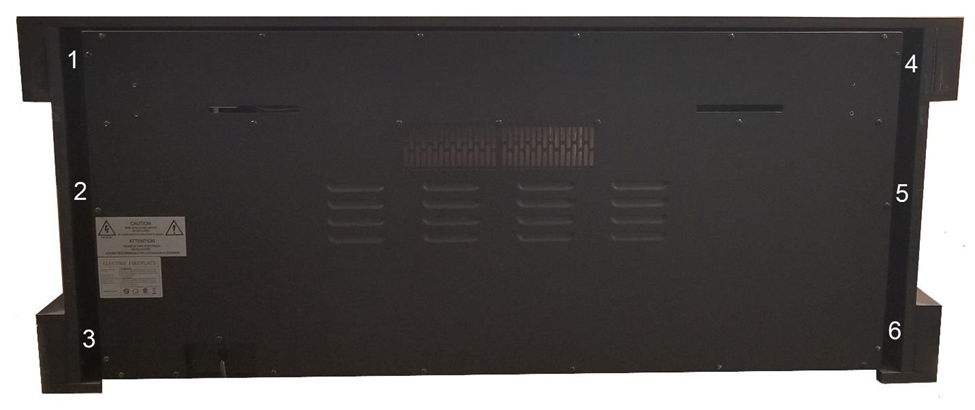
2. Remove the 3 left screws from the back of the firebox that are holding the firebox to the wood frame.
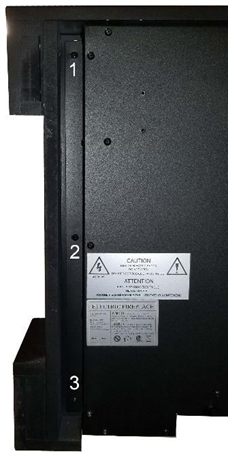
3. Remove the 3 left screws from the back of the firebox that are holding the firebox to the wood frame.
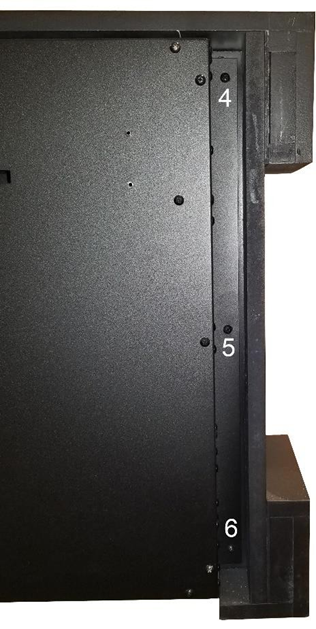
4. Once all 6 screws are removed, the wood frame will slide away from the firebox.
Need More Help?
Please contact our technical support team at 800-215-1990 for further troubleshooting or click the following link to file a support ticket:
https://touchstonehomeproducts.freshdesk.com/support/tickets/new
Was this article helpful?
That’s Great!
Thank you for your feedback
Sorry! We couldn't be helpful
Thank you for your feedback
Feedback sent
We appreciate your effort and will try to fix the article